
N8N: Why I Stopped Delegating Everything to Claude (And How I Cut My AI Bill by 10 by Taking Back Control)
I was hooked on Claude. For six months, I delegated everything to it: research, summaries, draft articles, email replies. Then I looked at my March 2026 API bill: €187 worth of tokens in a single month. For a solopreneur, that hurts.
I made a bet: migrate everything that doesn’t need real intelligence to N8N, and keep Claude for pure reasoning. The result after three months: 60% of my calls to Claude replaced, token bill divided by 3. Here is how.
Results at a Glance
- The baseline: Claude was doing everything, costing €187/month, and 60% of these tasks were just “plumbing” with no real added value.
- The solution: N8N for orchestration, Claude for reasoning. Both connected.
- The result: Claude bill divided by 3, content production time -40%, 3 autonomous N8N workflows.
- The biggest surprise: N8N isn’t a downgrade from Claude. It’s a tool that excels exactly where Claude is misused.
In three months, I replaced 60% of my Claude calls with N8N without losing quality. Here is exactly what I migrated, what worked, and the headaches I wish I had avoided.
1. What is N8N (Short Version)
N8N is an open-source (fair-code license) workflow automation platform created in 2019 in Berlin. It allows you to connect applications together via a visual node-based interface, similar to Zapier or Make, but with two fundamental differences:
- Free and unlimited self-hosting: the Community Edition installs on your own server, with no run limits. This is a game-changer for anyone who knows Docker.
- Native code execution: you can write JavaScript or Python directly inside your workflows, with no workarounds needed.
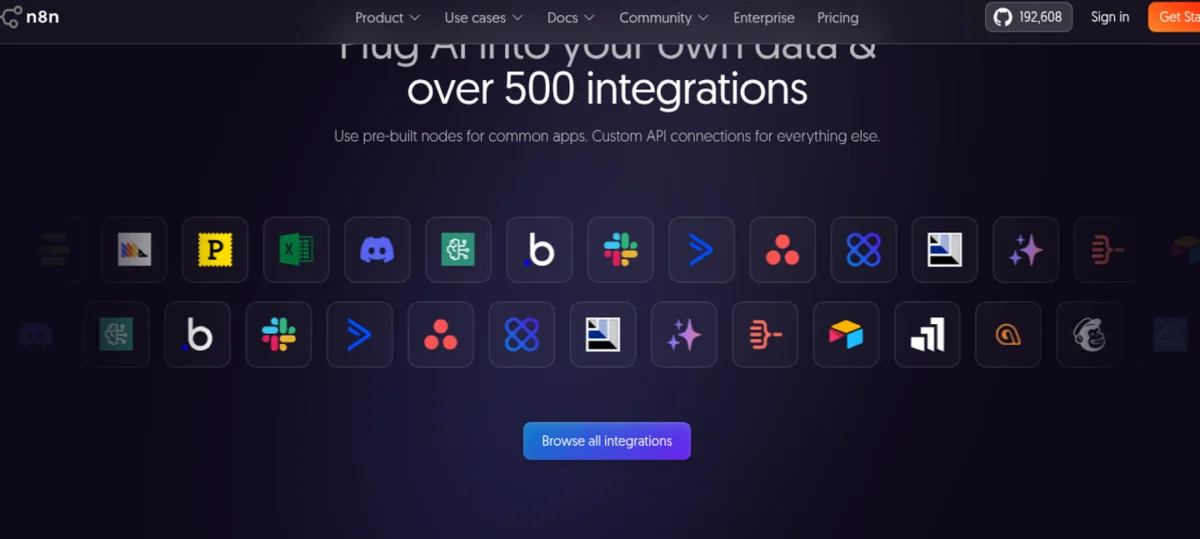
The platform offers more than 400 native integrations (source: n8n.io) and allows connecting any REST or GraphQL API. It also features built-in AI nodes (OpenAI, Hugging Face, LangChain) that allow calling language models directly within a deterministic workflow. This is precisely what makes the hybrid architecture possible.
2. My Stack Before N8N: Claude Did It All
Before N8N, my “automation stack” could be summarized in one sentence: I asked Claude questions via API for absolutely everything.
Here are the 6 recurring tasks I delegated to it every week:
| Task | Frequency | Estimated tokens / call | Estimated monthly cost |
|---|---|---|---|
| Lead enrichment (LinkedIn → synthetic report) | 40×/month | ~3,000 tokens | ~€7.80 |
| Competitor watch (3 scraped newsletters → summary) | 20×/month | ~5,000 tokens | ~€6.50 |
| Invoice/follow-up template generation | 15×/month | ~2,000 tokens | ~€1.95 |
| Incoming email sorting and categorization | 80×/month | ~1,500 tokens | ~€7.80 |
| Call transcripts summarization | 8×/month | ~8,000 tokens | ~€4.15 |
| Canned responses to client questions | 30×/month | ~2,000 tokens | ~€3.90 |
Calculation based on Claude Sonnet 4.6 pricing ($3/M input tokens, $15/M output tokens (source: Anthropic), with an average of 70% input / 30% output. Estimated total: ~€32/month just for these tasks, and that does not cover my creative uses (writing, strategy, code) which easily added another €100-150.
The real issue wasn’t even the cost. It was non-reproducibility. Every call to Claude could yield a slightly different output. For lead enrichment, I had no guarantee that the output format would be consistent from one day to the next. And when a call failed (timeout, rate limiting, unexpected response), I had no trace of what went wrong.
Nothing Claude generates is completely safe from hallucinations. Even with a sharp prompt and few-shot examples, the error rate on pure extraction tasks is never 0%. My N8N workflows, once tested, have an error rate of exactly 0% on deterministic transformations.
3. What N8N Does Better Than Claude (And Why It Is Irreversible)
Deterministic Reliability
An N8N workflow executes exactly the same steps on every run. No variation, no hallucinations, no “sorry, let me rephrase.” When I enrich a lead, the output JSON always has the same structure. My CRM doesn’t crash because the `company_size` field changed from `”10-50″` to `”small business”` depending on the LLM’s mood.
Total Traceability
Every execution is logged. I can go back three weeks and see exactly what a workflow produced for a specific lead. With Claude, if I didn’t save the response manually, it was lost. N8N’s Pro plan ($50/month, 10,000 executions) includes 7 days of execution history; the Business plan ($667/month billed annually) goes up to 30 days (source: n8n.io/pricing).
Fixed and Predictable Cost
This is the point that changed everything for me. N8N bills per complete workflow execution, not per step. A 3-step workflow and a 30-step workflow cost the same: 1 execution. With the Pro plan at $50/month for 10,000 executions, each execution costs me $0.005, whether there are 5 steps or 50.
Compare that to a Claude Sonnet call which can cost anywhere from $0.01 (simple task) to $0.50 (long context + reasoning), and the math quickly becomes clear.
No Rate Limiting, No Random Timeouts
The Claude API has rate limits. When I sent 40 lead enrichments at once, I had to handle retries, backoffs, and sometimes accept that a third of the calls would fail. Self-hosted N8N, however, runs 24/7 on my VPS without any external bottlenecks.
4. What Claude Does Better (Why I Keep Both)
Don’t cancel your Claude subscription just yet. It remains irreplaceable on several fronts:
- Complex reasoning: analyzing a nuanced business situation, proposing an editorial strategy, debugging a tricky bug. No deterministic workflow can replace that.
- Creative generation: writing an article like this one, finding a hook, rewriting an awkward paragraph.
- Unstructured tasks: a client sends me a confusing 15-line email with three implicit questions. Claude deciphers it in 3 seconds. An N8N workflow would require dedicated parsing logic.
- Incremental learning: I can correct Claude mid-conversation (“no, make it more formal”), whereas a workflow has to be modified in its editor.
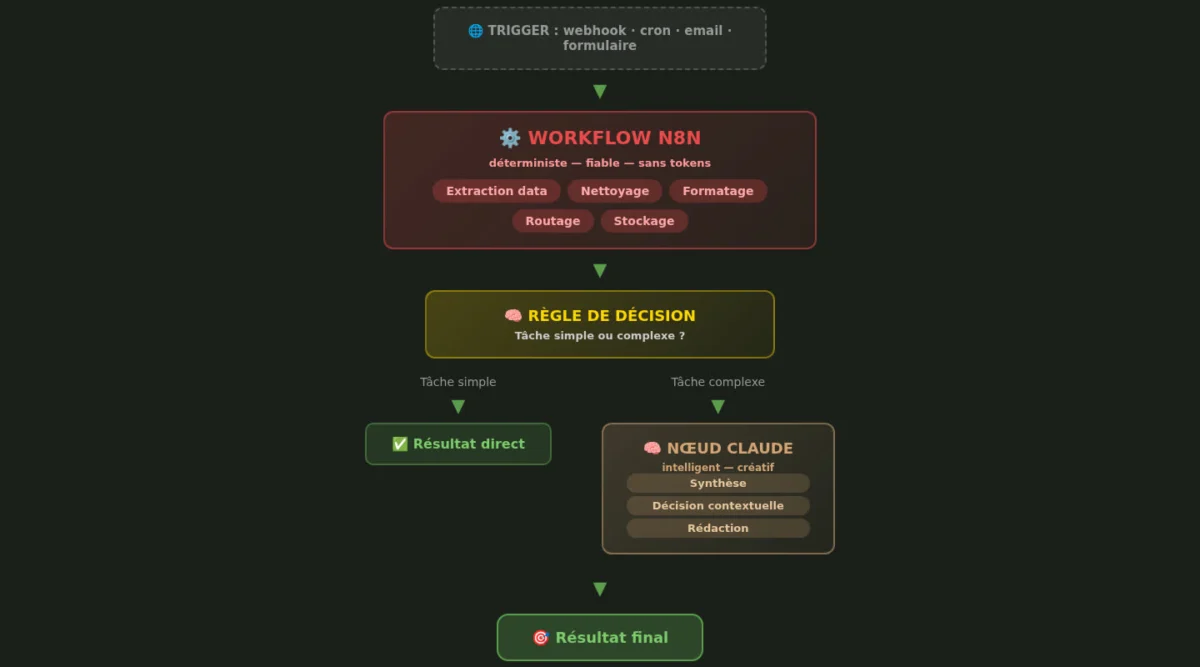
My Current Hybrid Architecture
Here is how I split things today:
5. N8N vs Make vs Zapier: Comparative Table
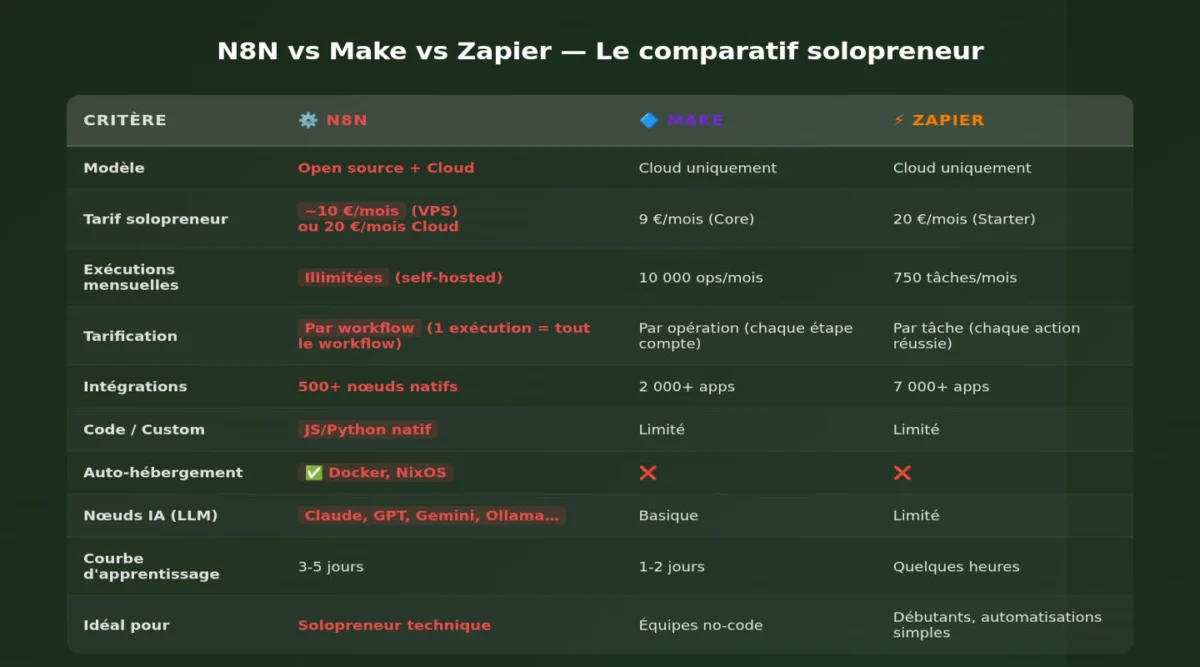
I tested all three. Here is a comparison based on public data from each platform (2026 rates, billed annually):
| Criterion | N8N | Make | Zapier |
|---|---|---|---|
| Integrations | 400+ nodes | 1,800+ apps | 6,000+ apps |
| Entry price | $20/month (2.5k exec) | €24/month (2.5k ops) | $19.99/month (750 tasks) |
| Mid-range price | $50/month (10k exec) | €60/month (10k ops) | $49/month (2k tasks) |
| Billing unit | Per execution (no matter the number of steps) | Per operation (each step counts as 1 op) | Per task (each step = 1 task) |
| Self-hosting | ✅ Free, unlimited | ❌ | ❌ |
| Native code | ✅ JS + Python | ⚠️ Limited functions | ⚠️ Code steps (JS/Python) |
| Native AI | ✅ LangChain nodes, LLM | ✅ Integrated AI modules | ✅ ChatGPT plugin |
| Git Versioning | ✅ (Business plan) | ❌ | ❌ |
| Learning curve | Steep | Moderate | Easy |
| GDPR / Local Data | Excellent (self-hosted) | Good (EU servers) | Good (with DPA) |
The key point: N8N’s “per execution” billing radically changes the economic equation as soon as your workflows have more than 3-4 steps. A 10-step N8N workflow costs 1 execution. On Zapier, this same workflow consumes 10 tasks. On Make, 10 operations.
Let’s take a concrete case: 10,000 runs/month of an 8-step workflow.
| Platform | Units consumed | Required plan | Monthly cost (billed annually) |
|---|---|---|---|
| N8N | 10,000 executions | Pro | $50 |
| Make | 80,000 operations | Scale (~€179/month) | ~€179 |
| Zapier | 80,000 tasks | Company (~$500+/month) | ~$500+ |
(Sources: n8n.io/pricing, make.com/pricing, zapier.com/pricing, 2026 public rates)
For a solopreneur, the difference is massive. And if you self-host the Community Edition (free), your only cost is the VPS: $5 to $20/month depending on the power needed.
6. The 3 Winning Workflows (The Ones That Really Changed My Week)
Workflow 1: Automated Lead Enrichment
Before: I copy-pasted a LinkedIn profile into Claude → it output a profile sheet → I copy-pasted it into Airtable. 5 minutes per lead, 40 leads/month = 3h20 wasted + €7.80 in tokens.
Now: A webhook receives the LinkedIn URL → N8N scrapes public data → cleans and structures it → calls Claude only for the qualitative summary (50 tokens instead of 3,000) → writes to Airtable.
Gain: 3 hours/month saved, token cost divided by 10 on this task.
Workflow 2: Weekly Competitor Watch
Before: Every Monday, I read 3 newsletters, took notes, and asked Claude to synthesize them. 45 minutes.
Now: A weekly cron → N8N scrapes the 3 sources → cleans the HTML → consolidates → sends Claude a tightly framed prompt → stores the summary in Notion + sends me a Telegram summary.
Gain: 3 hours/month, systematic monitoring even when I’m overwhelmed.
Workflow 3: Invoicing and Follow-ups
Before: I generated invoices manually in Google Docs, kept track of due dates in a corner of Notion, and followed up from memory. Result: there were always 1 or 2 unpaid invoices dragging on.
Now: An Airtable template with client info → N8N generates the PDF (via HTML → PDF node) → sends automatic email → if unpaid after 7 days, automated follow-up → if unpaid after 14 days, sends me a Slack alert.
Gain: Zero forgotten invoices in 3 months. Invaluable.
7. The 3 Headaches (Let’s Be Honest)
Headache 1: The Learning Curve is Real
N8N is not a no-code tool for beginners. The terminology is technical (webhooks, JSON, expressions, function nodes), and debugging requires understanding what happens between each step. I spent two full weekends getting productive, and I’ve been coding for 15 years.
If you are coming from Zapier, expect a shock. N8N’s documentation is good but dense. The community is active (GitHub: over 192,000 stars (github.com/n8n-io/n8n)), but responses often assume a technical background.
My advice: if you’ve never done automation before, start with Make, then migrate to N8N when you feel restricted. If you’re a developer, N8N will feel familiar from day one.
Headache 2: Self-Hosting is Not “Free”
Yes, the Community Edition is free. But:
- Un VPS correct (4 Go RAM, 2 vCPU minimum pour du production) coûte 20 à 40 $/mois chez DigitalOcean ou Hetzner.
- Il faut maintenir Postgres, gérer les backups, appliquer les mises à jour de sécurité.
- Le monitoring et les alertes, c’est vous. Si le serveur tombe à 3h du matin, personne ne le redémarre à votre place.
J’ai estimé que je passe environ 2 heures par mois sur la maintenance de mon instance self-hosted. À mon taux horaire, c’est plus cher que le plan Cloud Pro à 50 $/mois. J’ai donc basculé sur le Cloud Pro. Le confort a un prix, et pour un solopreneur solo, c’est le bon arbitrage.
Galère 3 : Les intégrations sont puissantes mais inégales
N8N propose 400+ intégrations, contre 6 000+ pour Zapier. Si vous utilisez des SaaS de niche, vous devrez probablement écrire vos propres appels API. C’est faisable (les nœuds HTTP Request et Webhook sont excellents), mais ça ajoute du travail.
Exemple : j’ai dû coder mon intégration avec mon outil de comptabilité français (aucun nœud natif). 3 heures de développement pour un webhook + parsing XML. Sur Zapier, l’intégration existe probablement en natif. Le compromis est clair : flexibilité vs immédiateté.
8. La règle des 3 questions pour choisir N8N vs Claude
À chaque fois que j’hésite entre automatiser avec N8N ou déléguer à Claude, je me pose ces trois questions :
- Le résultat attendu est-il strictement déterministe ?
→ Si oui, N8N. Si j’ai besoin du même format de sortie à chaque fois, un LLM est un risque.
- La tâche est-elle répétitive (>10×/mois) ?
→ Si oui, N8N. Le coût fixe d’un workflow est amorti très vite face au coût variable des tokens.
- La tâche nécessite-t-elle un raisonnement créatif ou une compréhension nuancée ?
→ Si oui, Claude. Aucun workflow ne remplace l’intelligence contextuelle d’un LLM.
Grille de décision rapide :
| Situation | Choix |
|---|---|
| Formatage, extraction, routage de données | N8N |
| Synthèse de contenu non structuré | Claude |
| Tâche répétitive + format fixe | N8N |
| Décision business contextuelle | Claude |
| Pipeline data → synthèse IA | N8N + Claude (hybride) |
9. Pour qui / Pas pour qui
N8N est fait pour vous si :
- Vous êtes développeur ou solopreneur technique à l’aise avec JSON, API REST, et le concept de webhook.
- Vous avez des workflows complexes (5+ étapes) qui tournent à haute fréquence.
- Vous valorisez la souveraineté des données (self-hosting, GDPR maîtrisé).
- Vous voulez combiner automatisation déterministe et IA dans un même pipeline.
- Vous en avez marre de payer par étape et cherchez un modèle de coût prévisible.
N8N n’est pas pour vous si :
- Vous êtes non-technique et souhaitez automatiser sans jamais toucher à du code, allez sur Make ou Zapier.
- Vous avez besoin d’intégrations très grand public (6 000+ apps), Zapier reste imbattable.
- Vous voulez une solution zéro maintenance, zéro configuration, le plan Cloud est bon, mais il reste plus technique que Zapier.
- Vous n’automatisez que quelques tâches simples par mois, le coût d’apprentissage ne se justifie pas.
10. Le bilan chiffré après 3 mois
| Indicateur | Avant (100 % Claude) | Après (N8N + Claude hybride) | Évolution |
|---|---|---|---|
| Appels API Claude / mois | ~190 | ~75 | -60 % |
| Facture tokens Claude | ~187 € | ~65 € | ÷ 2,9 |
| Abonnement automatisation | 0 € | 50 € (N8N Pro) | +50 € |
| Coût total mensuel | ~187 € | ~115 € | -38 % |
| Temps perdu en tâches répétitives | ~8h/mois | ~1h/mois | -7h/mois |
| Taux d’erreur (format incohérent) | ~15 % | <1 % | Qualité ↑ |
| Traçabilité des actions | Faible (pas de logs) | Totale (historique N8N) | Audit ↑ |
Le verdict : je ne reviendrai pas en arrière. N8N a pris en charge tout le « plomberie » déterministe de mon business, et Claude est redevenu ce qu’il aurait toujours dû être : un partenaire de réflexion, pas un exécutant de tâches répétitives.
Si vous êtes solopreneur technique et que vous passez plus de 50 €/mois en tokens Claude pour des tâches structurées, faites le calcul. Il y a de bonnes chances que N8N s’amortisse en moins de deux mois.
Mon conseil en une phrase : automatisez tout ce qui est déterministe avec N8N, gardez Claude pour tout ce qui nécessite de l’intelligence, et pour les cas hybrides, chaînez les deux.
FAQ
1. Combien coûte vraiment N8N ?
Le plan Cloud Starter est à 20 $/mois (2 500 exécutions, facturation annuelle). Le Cloud Pro à 50 $/mois (10 000 exécutions). La Community Edition est gratuite en self-hosting, mais prévoyez 20 à 40 $/mois de VPS et 2h/mois de maintenance. La facturation est par exécution complète de workflow, pas par étape. Un workflow de 30 étapes coûte la même chose qu’un workflow de 2 étapes. (Source : n8n.io/pricing)
2. Faut-il savoir coder pour utiliser N8N ?
Pas obligatoirement pour les workflows simples (type « si nouvel email Gmail → créer une tâche Notion »). Mais dès que vous sortez des sentiers battus (API customs, transformations de données complexes, self-hosting), des bases en JavaScript et en APIs REST deviennent nécessaires. La courbe d’apprentissage est significativement plus raide que Make ou Zapier.
3. N8N peut-il remplacer totalement Claude ou ChatGPT ?
Non, et ce n’est pas le but. N8N excelle sur les tâches déterministes et répétitives (extraction, formatage, routage). Les LLM restent irremplaçables pour le raisonnement, la création de contenu et l’analyse nuancée. L’architecture optimale est hybride : N8N pour le pipeline, Claude pour l’intelligence au bon moment dans ce pipeline.
4. Le self-hosting est-il vraiment gratuit ?
Le logiciel est gratuit (licence Sustainable Use License). Mais le coût réel inclut : un VPS (20-40 $/mois), une base Postgres, les backups, les mises à jour, et votre temps de maintenance. Pour un solopreneur qui facture son temps, le plan Cloud Pro à 50 $/mois est souvent plus économique que le self-hosting, une fois le temps de maintenance valorisé.
5. N8N est-il fiable pour un usage professionnel ?
Oui. La plateforme est mature, utilisée en production par des entreprises de toutes tailles. La Community Edition a 192 000+ étoiles GitHub. Les plans Cloud sont hébergés par N8N avec SLA sur les plans Enterprise. En 3 mois d’usage quotidien, je n’ai eu aucune panne sur le plan Cloud Pro. Le seul risque est lié au self-hosting mal configuré (pas de backup, pas de monitoring).




Leave a Reply