
Subagents: orchestrate a team of AI agents without paying for a studio
A lone AI agent quickly resembles an overloaded freelancer. I ask it for a 40-page audit, it charges in with enthusiasm, then its working memory saturates around the tenth URL. It forgets the initial plan, mixes up conclusions, and I am left with a shaky half-unusable report.
Subagents change the game: instead of one exhausted worker, you become the conductor of a small specialized team. This article shows the pattern step by step, a complete SEO case, and the real token cost, honest figures included.
✨ Key Takeaways
- A subagent is a secondary agent with its own context window, launched and supervised by a main agent.
- The winning pattern fits in three roles: an orchestrator that plans, workers that execute, one consolidated final synthesis.
- It is worth it as soon as the task can be split up: multi-page audits, multi-source monitoring, multi-criteria proofreading.
- The token cost climbs fast: often count a factor of two to three compared with the single agent, in exchange for reliability and speed.
- No expensive infrastructure needed: Claude Code handles AI subagents natively through simple Markdown files.
Since I started working in multi-agent mode, my long audits fit within a single session without losing the thread. It is not magic, it is organization: I split, I delegate, I consolidate. And I hired nobody.
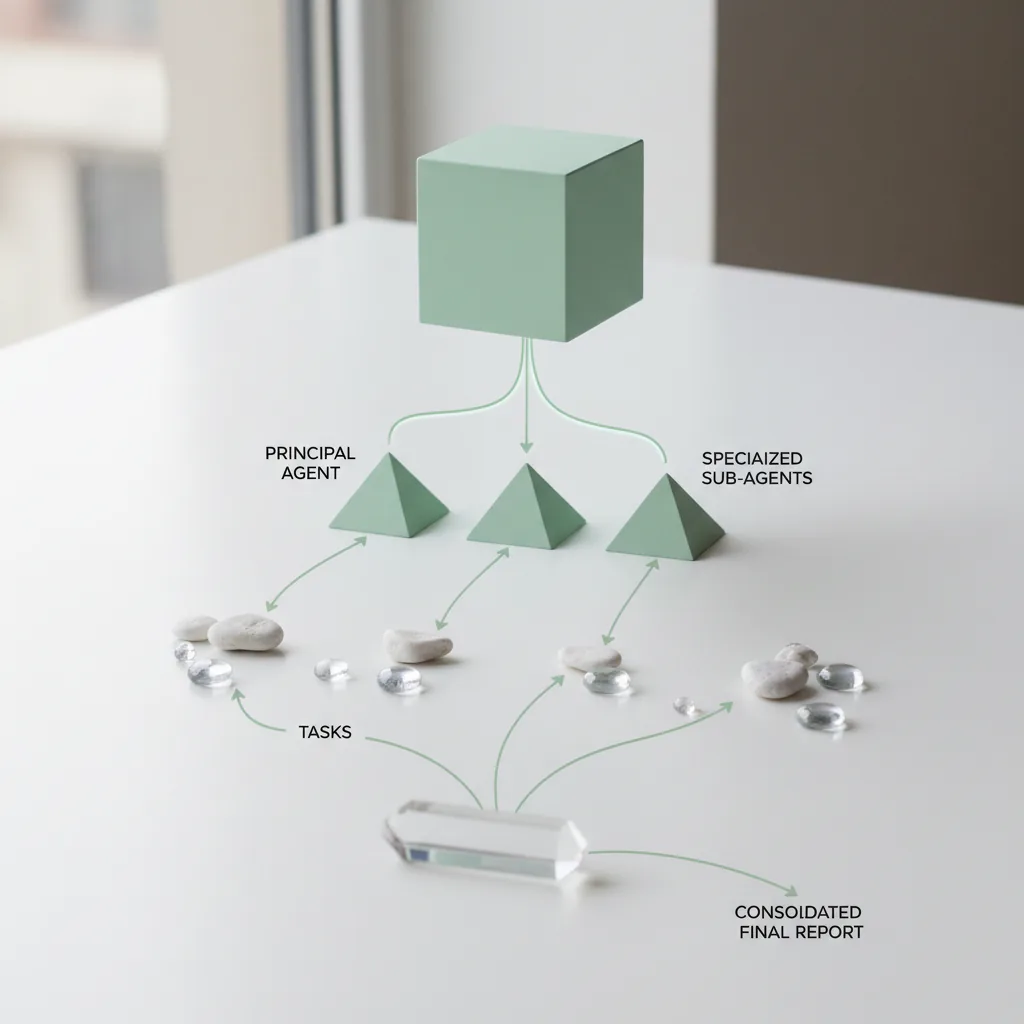
The conductor pattern and its workers
The principle fits in one sentence: the orchestrator thinks, the workers do. The main agent receives your overall request, splits it into autonomous subtasks, then launches a subagent for each. Every worker starts with a blank context, a specialized prompt and a strict deliverable instruction.
The key to the pattern is context isolation. A subagent auditing page 12 does not carry the mental weight of the previous eleven pages. Its context window stays light, so its analyses stay precise to the end of the series. The orchestrator, for its part, only receives condensed syntheses, never raw detail.
Three roles are enough in the vast majority of AI-agent orchestration situations:
- The conductor: understands the goal, writes the plan, hands out batches, checks the returns.
- The specialized workers: a narrow prompt, limited tools, an imposed output format.
- The consolidator, often the orchestrator itself: merges the deliverables into one coherent document.
This pattern exists in several tools on the market. Claude Code implements it natively, Hermes Agent exposes a delegation function that drives my competitive-monitoring stack, and frameworks like CrewAI or LangGraph generalize it at scale. Let us stay concrete with the most accessible implementation.
Claude Code subagents: setting them up in practice
Before charging ahead, make sure you have a sound base: my guide to infrastructure for AI agents covers installation and fundamentals. What follows assumes Claude Code already runs on your machine (official documentation).
In Claude Code, a subagent is declared in a simple Markdown file stored in your project’s `.claude/agents/` folder. The frontmatter describes the agent, the file body serves as the system prompt. Here is a real example from my arsenal:
“`markdown
You are a senior SEO auditor. For each provided URL:
- Fetch the page and analyze title, meta description and heading structure.
- Check the presence and relevance of internal linking.
- Return a four-column table: URL, finding, severity, recommendation.
Only process the provided URLs. No recommendation outside the scope.
“`
Two ways to trigger the agent. Automatic delegation first: when your request matches the `description` field, the orchestrator delegates by itself. Then the explicit call, naming `audit-seo-page` directly in your instruction. The `tools` field limits rights: an audit worker does not need to be able to write files.
The beginner mistakes I made for you:
- A vague description: the orchestrator does not know when to delegate, it keeps everything to itself and saturates.
- Jack-of-all-trades workers: a subagent must do ONE thing. I merged technical and semantic audits once, the result was indigestible.
- No imposed output format: impossible to merge ten reports in different styles without spending the whole evening on it.
Full example: a multi-page SEO audit
Here is the workflow exactly as I run it to audit about twenty pages of a niche site. The goal: spot weak pages before an internal-linking campaign.
Step 1: I prepare a `urls.txt` file with the addresses to audit, grouped by topic. Five minutes of copy-paste, nothing more.
Step 2: I instruct the orchestrator in a single order. “Read urls.txt, group the URLs into batches of five, and launch one audit subagent per batch. Each return arrives as a normalized table.”
Step 3: the workers grind away in parallel, each on its own batch. Five separate contexts, zero cross-contamination between topics.
Step 4: the orchestrator merges the tables, sorts by severity and produces the final synthesis. Red pages to rework first, quick wins usable this weekend, site-wide trends.
The gain is not just speed. Above all it is the consistency of quality, from the first batch to the last. In single-agent mode, my 20-page audits produced sloppy entries near the end, the classic symptom of a saturated context. With AI subagents, sheet number 20 is as clean as number 1.

Token costs: the honest part
Let us talk money, because few tutorials dare. Each subagent owns its own context window, hence its own meter. Your system prompt repeats for every worker, and the orchestrator pays for re-reading every synthesis coming back up.
Order of magnitude observed on my sessions: a task split into subagents often consumes two to three times more tokens than the same task run single-agent. In return, you buy reliability on long tasks and parallelization on decoupleable ones. On an audit that conditions weeks of work, the bill remains a detail.
Three levers to contain spending:
- Impose short deliverables: a table capped at ten rows rather than a “detailed report” with fuzzy dimensions.
- Limit each worker’s tools to the bare minimum: fewer declared tools, fewer tokens consumed per call.
- Reserve multi-agent for tasks that deserve it: those that saturate a single context or parallelize cleanly.
When subagents are worth it (and when they sink the bill)
| Criterion | A single agent | Team of subagents |
|---|---|---|
| Task size | A few pages, one file | 20 pages, 50 files, several sources |
| Context needed | Everything fits in one window | It overflows, quality drops near the end |
| Parallelism | Sequential, one thing after another | Independent batches processed simultaneously |
| Token budget | Tight, predictable | Comfortable, or high-value task |
| Setup effort | Immediate | A few config files to maintain |
My two-second decision rule: if I can ask everything in one prompt without exceeding half the available context, I stay single-agent. As soon as the task smells like a marathon, I split and delegate.
Final word
A team of subagents does not replace your judgment, it relieves it of thankless tasks. Start small: one orchestrator, two workers, a ten-page audit. If the deliverables come back clean, you hold an AI-agent orchestration method that grows with your projects, without hiring anyone or subscribing to an automation studio.
I document my next multi-agent setups in the Lab section, full configs included, successes and crashes alike.
FAQ: frequently asked questions about AI subagents
What is the difference between an agent and a subagent?
An agent works directly with you in the main conversation. A subagent is launched by that agent to execute a subtask in its own context, then it hands a condensed deliverable back to the orchestrator.
Do you need to pay for multiple subscriptions to run multi-agent?
No. In Claude Code, subagents run inside your existing session: a single subscription or API account is enough. What increases is token consumption, not the number of licenses.
How many subagents can you launch in parallel?
Technically dozens, but the useful limit sits much lower. Four to eight workers cover most needs; beyond that, supervision becomes hard and the bill climbs without obvious benefit.
Are subagents suitable for beginners?
Yes, provided you start with a simple case and a single specialized subagent. Claude Code subagents remain the easiest entry point: the difficulty is not technical, it lies in splitting the task well and writing narrow worker prompts with a defined deliverable.
Can AI subagents be used outside software development?
Absolutely. SEO audits, market monitoring, multi-criteria review of an article, sorting leads or job applications: as soon as a mission splits into homogeneous batches, the conductor pattern works.




Leave a Reply