
AI Agents: The 5 Technical Foundations for an Unbreakable Setup
If you’re just starting out with building autonomous agent systems, it can be intimidating. You often get lost choosing the best language model (LLM) or the latest trendy framework. I’ve made all those mistakes. But the truth is elsewhere: the first steps of your technical setup matter far more than the AI you choose afterward.
My philosophy is simple: you don’t argue with AI, you build with it. Between my morning classes and evening web projects, I don’t have time to deal with disconnections or context losses. If you set up your foundation correctly from the start, you’ll never lose your momentum (the famous “flow”).
TL;DR: What you need to remember for your infrastructure
For those who want to get straight to the point, here’s exactly what you need to set up before launching your first agent:
- A private mesh network (Tailscale) to connect all your machines.
- A cross-platform SSH client (Termius) for persistent access.
- A terminal multiplexer (Tmux) so your sessions survive disconnections.
- A private Git repository to serve as a memory for your agents.
- Automation scripts for absolutely every repetitive task.
Why Technical Infrastructure Matters More Than the Choice of AI
Agentic work assigned to AI agents is inherently long. Unlike a simple ChatGPT query where you expect an immediate response, an autonomous agent will search, analyze, code, and iterate for hours.
Your terminal must survive this. If you close your laptop or your connection drops, your work environment must not collapse. This is the foundation no one talks about on social media. Everything that comes after these foundations is just decoration. If you skip this robustness, you won’t get far in automating your business.
Ranking: The Top 5 Must-Have Tools in My Infrastructure
Here is the exact list of elements you need to master inside and out to become an Augmented Pro.
1. Tailscale: Your Secure Private Network
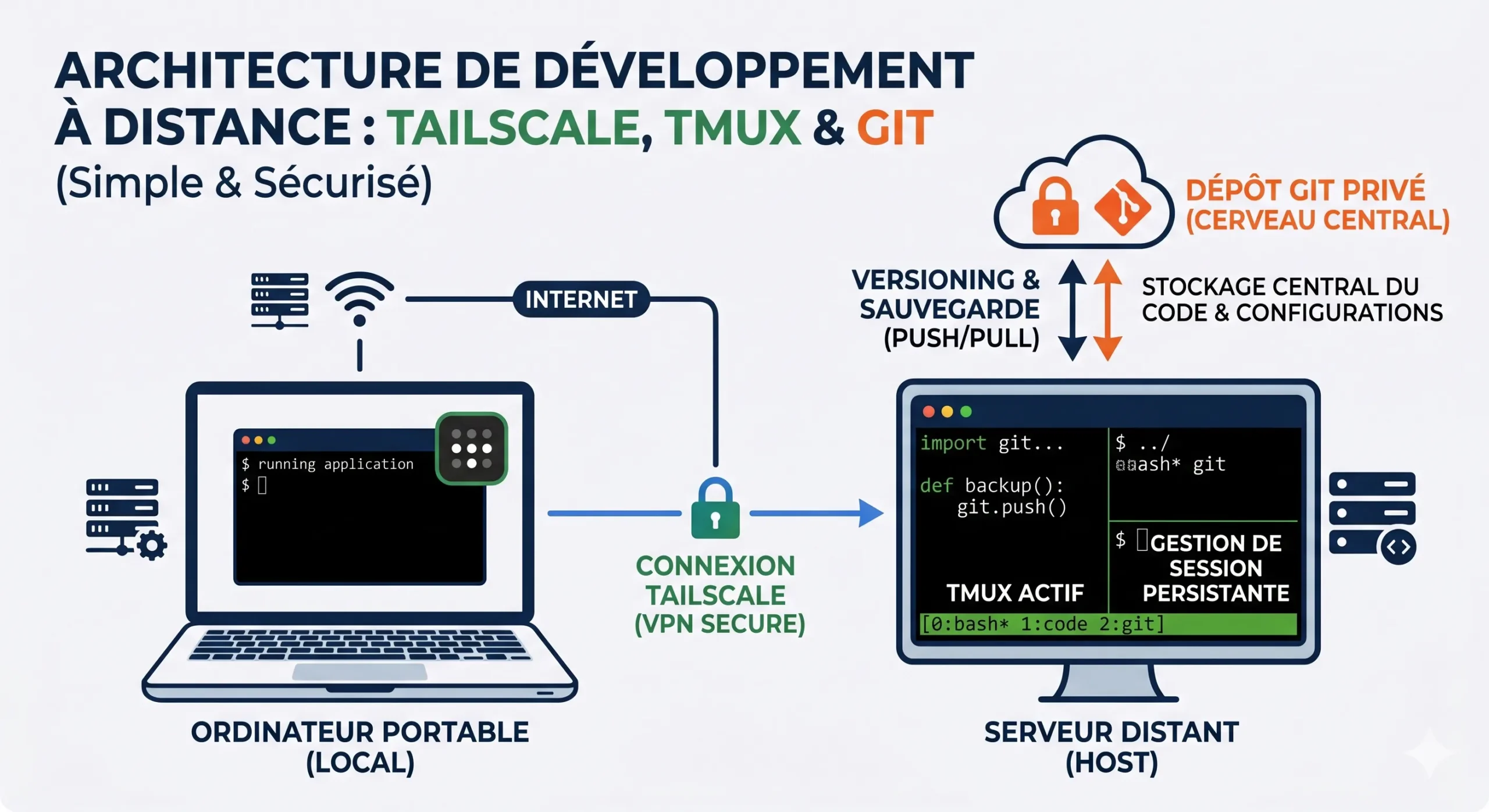
This is the absolute foundation. Tailscale creates a private mesh network across all the machines you own. Whether it’s your laptop, your desktop, or a rented node on a remote server, everything ends up on a single secure “tailnet.” Every machine is accessible from anywhere. Nothing else will work properly until this is in place.
2. Termius: Total Control Over the Network
Once the network is established, you need to access it. Termius is an SSH client that goes through this tailnet. It allows you to reach any node on your network, including from your phone. The result: you are never far from your technical infrastructure (stack).
3. Tmux: Keep Your Sessions Alive
It’s your safety net. Tmux allows you to have persistent terminal sessions. You can disconnect, close your laptop lid, and when you come back, every session is exactly where you left it. For long-running AI-driven processes, this is vital.
4. A Private Git Repository: The Memory Layer
This is the discovery I’m most proud of. A simple private Git repository acts as the shared memory layer for all my agents. They pull data, work on it, and merge their results. The code and data stay alive between sessions. All the context that would eventually die or get lost in a typical chat window survives here, well-documented.
5. Script automation from day one
If you have to do something more than twice, it should become a script. That’s Pareto’s Law applied to computing. Script your SSH aliases for each node, your installation scripts, and automate all the boring boilerplate code. Stop wasting time on low-value tasks.
Tech Stack Overview
To quickly see how useful each tool is, here’s a summary table of this infrastructure:
| Technical Tool | Main Function | Direct Benefit for Your AI Agents |
|---|---|---|
| Tailscale | VPN / Mesh Network | Connects your agent’s servers seamlessly. |
| Termius | Unified SSH Client | Monitor your agent from any device. |
| Tmux | Terminal Multiplexer | Prevents your agent from crashing due to connection drops. |
| Private Git Repository | Version Control Manager | Serves as a shared brain and long-term memory. |
| Shell Scripts | Command Automation | Saves precious time on deployment. |
The Key Habit: AI as a Technical Assistant
Having the right tools is one thing, knowing how to use them without burning the midnight oil is another. The real habit that ties this whole system together is asking the AI itself to help you build it.
Stuck on a Tailscale configuration? Got an error in your Tmux terminal? Don’t waste hours on forums. Let the agent do the heavy lifting: copy-paste the error, ask it for the exact config file, then systematically verify what it gives you. Lock in these five tools, adopt this habit of technical delegation, and you’ll succeed in your transition to automation.
FAQ: Frequently Asked Questions About AI Agent Infrastructure
Do you need to be a developer to install these tools?
No. That’s the beauty of using AI. If you don’t know how to install Tmux or write a bash script, just ask a model like Claude or GPT-5.X to generate the exact command for you. Be curious and let AI be your technical mentor.
Why not just use an LLM in a web browser?
A browser-based LLM is reactive (it answers a question). An agent is proactive (it executes a series of complex tasks in the background). To work autonomously for hours, it needs a robust server environment, hence the importance of this technical setup.
How much does this basic infrastructure cost?
Here’s the best part: in a cost-saving approach, this foundation is extremely affordable. Tailscale, Git (via GitHub or GitLab), and Tmux offer very generous free tiers. You’ll only need to invest in a small server or use your own machines.




Leave a Reply