
Hermes Agent: the personal assistant that remembers everything (and costs 10x less)
Executive Summary
- Persistent memory: Hermes keeps your context across sessions, no more repeating your instructions
- 40+ built-in tools: web, Apple Notes, iMessage, cron jobs and image generation, ready out of the box
- 10x cheaper: one founder went from $130 down to $10 for the same results
Hermes Agent is the most cost-effective terminal AI agent for pros who want memory and automation without breaking the bank.
You use Claude every day, and you re-explain your context at every new session? You watch your token bill climb without understanding why? I tested Hermes, and a single number convinced me to switch stacks: one founder went from $130 every 5 days on Claude to $10. Same output. Zero compromise.
What you stand to gain: the essentials in 30 seconds
Hermes at a glance:
- An AI agent that runs in your terminal, with persistent memory between every session
- 40+ tools preloaded from the moment you install it (web, Apple Notes, iMessage, cron jobs, image generation…)
- OpenRouter connection: you see exactly what each task costs you, per model
- Works on Android through Telegram, with agents named like teammates
- Deployment of your choice: bare metal, Docker or serverless on Modal
So what exactly is Hermes?
Hermes is a personal AI agent that lives in your command line. You install it on your machine with a single command. It connects to the LLMs of your choice through OpenRouter, runs tasks and, above all: it remembers everything it does.
Picture an AI teammate that checks its own notes from last week before answering you. One that knows exactly how much each task cost. One that can send an iMessage or trigger a cron job with no plugin to install.
This is not a chatbot. It is an execution layer sitting on top of the LLMs you already use.
The 3 Claude problems Hermes solves
If you have used Claude through its interface or through Open Claw (the desktop client), you have probably hit these frustrations:
- Zero memory: every session starts from scratch. You re-explain your projects, your preferences, your context. Pure wasted time.
- Unannounced restarts: gateway restarts break your long sessions at the worst possible moment.
- Total opacity on costs: you do not know which model costs you what, or why the bill is exploding.
Hermes solves these 3 structural problems. Not with magic, with architecture.
Hermes vs Claude: the honest comparison
| Criterion | Claude / Open Claw | Hermes |
|---|---|---|
| Memory between sessions | ❌ None | ✅ Persistent and indexed |
| Average cost (heavy use) | ~$130/5 days | ~$10/5 days |
| Cost visibility | Global, opaque | Per model and per task |
| Built-in tools | Via third-party plugins | 40+ native |
| Mobile deployment | ❌ | ✅ Via Telegram |
| Session stability | Frequent restarts | Stable |
| Open source | No | Yes |
The 40+ preloaded tools: nothing to install
This is one of Hermes’ strongest arguments. From the moment you install it, you have access to:
- Apple ecosystem: Apple Notes, iMessage, Find My
- Web: autonomous browsing, real-time web search
- Creation: image generation
- Automation: cron jobs to schedule your recurring tasks
- Dev: connection to your environment through gstack
For a consultant or a trainer inside the Apple ecosystem (and there are many of you in that situation), the gain is immediate. Your agent can read your notes, send you a recap or trigger an automatic report. Without any intervention on your part.

Persistent memory: the real game changer
Let me be blunt: this is the feature that changes everything.
Every task Hermes finishes is saved to memory. When you hand it a similar task later, it searches its own logs to find the solution again. No need to re-explain. No need to paste your usual context at the start of the session.
Over time, Hermes becomes increasingly effective on your specific workflows. It learns your preferred formats, your recurring clients, the way you structure deliverables. That is the fundamental difference between a generic tool and a real personal assistant.
“Over time it literally gets smarter at your specific workflows.” (Hermes documentation)
Step-by-step installation guide
Step 1: Install Hermes with one command
Installation happens from your terminal. A single line is enough. Check the exact command on Hermes’ official GitHub repository, since it can change with updates. If you would rather run it around the clock on a small server, I wrote a complete zero-to-live VPS setup tutorial.

Step 2: Connect OpenRouter
OpenRouter is the layer that lets you pick your LLM (GPT-4o, Claude, Llama, Mistral…) and see the exact cost per request.
- Create an account on openrouter.ai
- Generate your API key
- Enter it in the Hermes configuration
- Enable free model rotation, they change every week
From this step on, you see in real time what each task costs you, per model. No more bad surprises.
Step 3: Connect your tools
Obsidian: connect your whole vault. Hermes can read, search and summarize any note. For a trainer with hundreds of course notes, it is an instantly queryable external memory.
gstack: connect your development environment. Hermes navigates your projects, generates code and runs tasks directly inside your working context.
Custom skills: build your own skills for your business workflows: scraping a specific site, generating a report in your format, sending it to your clients automatically.

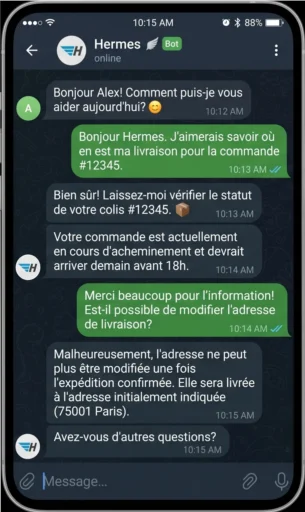
Step 4: Mobile access through Telegram (Android)
- Create a Telegram bot through BotFather
- Connect it to your Hermes instance
- Name your agent (e.g. “Max for research”, “Clara for writing”)
- Chat with it from your phone the way you would with a teammate
Imran, one of the builders in the community around Hermes, demoed this setup live. The result: an agent available on your phone, with all the memory and every tool of your desktop install.
The real ROI: stop paying an LLM to do the same thing every day
This is the most actionable advice in this guide. And the one I apply myself.
The principle is simple: instead of running a repetitive task every morning, have Hermes write it out as code once. After that, the script runs automatically, without burning a single token.
Concrete examples:
- Daily SEO report → coded once, run by cron job every morning at 7 a.m.
- Competitor price scraping → Python script generated by Hermes, launched automatically
- Industry watch summary → automated workflow, zero intervention
If you spend $5 a day in tokens on a repetitive task, you save $1,800 a year by coding it once. That is smart automation, not magic.
Which deployment mode should you pick?
| Mode | Who it is for | What you need to know |
|---|---|---|
| Bare metal | Developers, advanced technical profiles | Total control, direct infrastructure management |
| Docker | Intermediate profiles | Clean isolation, easier to maintain |
| Serverless (Modal) | Solopreneurs, non-devs | Zero server management, scales on demand |
For most of the pros reading these lines (consultants, trainers, solopreneurs), serverless deployment on Modal is the best starting point. You focus on the workflows, not on infrastructure management.
Top 3 use cases for independent professionals
🥇 The consultant with automated watch
Hermes reads their sources every morning, summarizes them into a PDF and sends the report at 7 a.m. via cron job. Zero tokens burned after the first setup. Zero manual intervention.
🥈 The trainer with Obsidian
A vault of 500 notes connected to Hermes. They prepare their sessions by asking questions of their own resources. Prep time cut by three. Their notes become a private search engine.
🥉 The multi-project solopreneur
Three agents named on Telegram for three distinct activities. Each agent has its own memory, its own tools, its own context. Like having three specialized assistants without paying three subscriptions.
Frequently asked questions
Is Hermes accessible if I am not a developer?
The base install is a single command. Configuring OpenRouter takes 10 minutes. Serverless deployment on Modal requires no server management skills. It is accessible to any motivated professional.
Does Hermes work on Windows?
Hermes runs natively on macOS and Linux. On Windows you have to go through WSL2 (Windows Subsystem for Linux). One extra step, but a well-documented one.
Are OpenRouter’s free models reliable?
They rotate, they change every week. They are perfectly fine for recurring tasks and automated scripts. For complex or urgent work, you pick a paid model at the exact cost shown.
Is my Hermes memory private?
Yes. Memory is stored locally on your machine or your server. No data is sent to a third party by default, apart from the requests you send to the LLMs through OpenRouter.
Can I have several agents with different roles?
Yes. You can name your agents and assign them distinct sets of tools and memories. That is the recommended setup for pros juggling several projects in parallel.
Does Hermes replace Claude?
No, Hermes uses Claude (and other models) as its engine. It is the execution, memory and tooling layer that was missing on top of existing LLMs. The two are complementary.
Going further
Hermes is one of the most solid building blocks available today for automating your AI workflows. The next logical step: learning to build custom skills for your own trade, and combining Hermes with the tools you already use (Notion, Obsidian, your business APIs). That day-to-day automation is part of my broader approach to AI agents, which I summed up in my guide to orchestrating a team of AI subagents.
And if you wonder what it looks like once you take the leap, I told the whole story of why I quit n8n for my own AI agents, and what workflows could no longer give me.
The Labo take


Leave a Reply