
Meeting AI: prepare, transcribe, act — the complete 2026 workflow
You walk out of a meeting. Your notes are scattered across a sticky note, a chat channel and your memory. Three weeks later, nobody knows who was supposed to deliver what, nor why that decision was made. The problem is not your memory: it is the absence of a workflow.
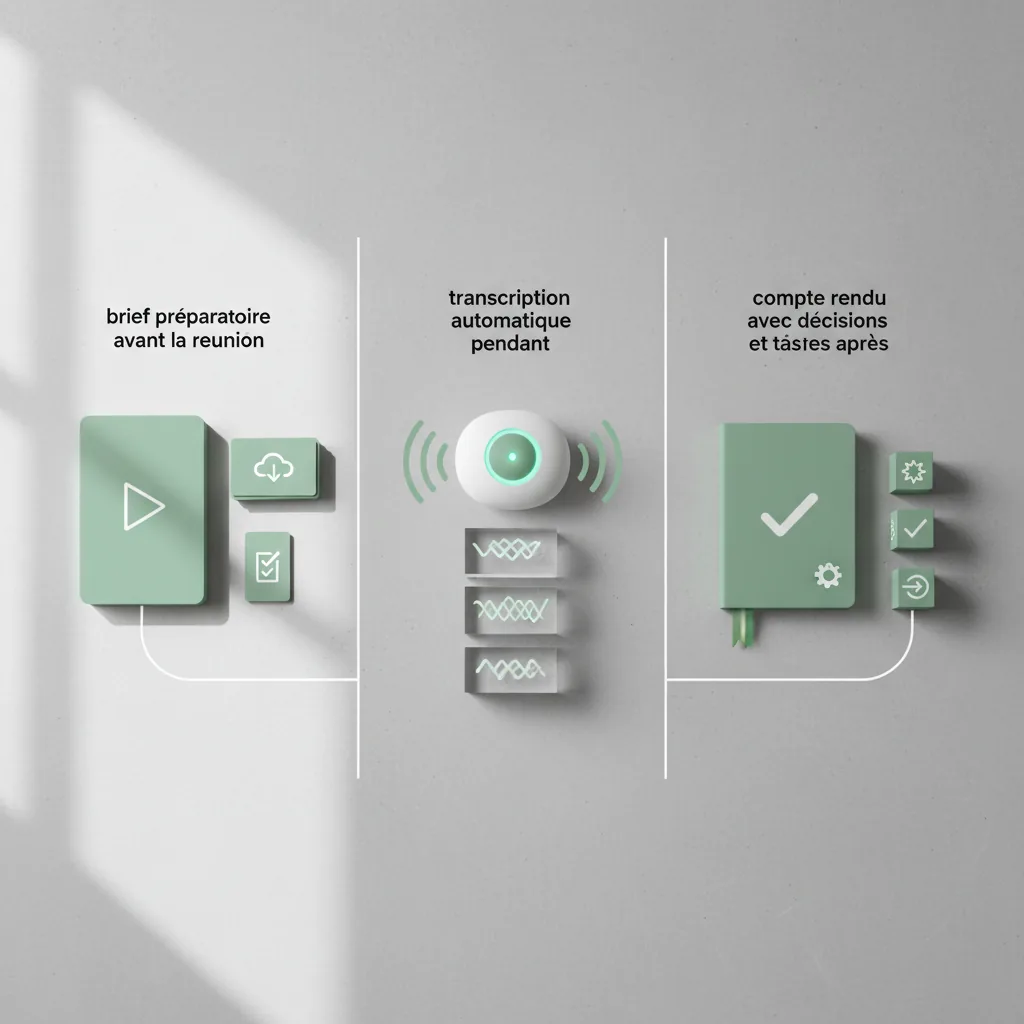
I rebuilt my way of working in three phases: before, during, after. Each step relies on a different use of meeting AI, with a ready-to-copy prompt template. Result: traced decisions, dated tasks, and zero dead verbatim rotting at the bottom of a folder.
✨ Key Takeaways
- A meeting AI workflow fits in three phases: prepare with a generated brief, capture with AI transcription, conclude with automatic meeting minutes.
- Most of the value is decided before the meeting: a clear brief removes the pointless round-table and refocuses the discussion.
- During the meeting, your only role is to facilitate: the tool takes notes, timestamps and tells speakers apart.
- Afterwards, a single template turns the verbatim into decisions, actions and named owners.
- Without a loop into your prioritization system, the best minutes remain a dead document.
That is the full mechanics, the one I apply to every work session, from the community call to the weekly check-in. My meeting AI workflow fits in a table I share below.
Why most sets of minutes die within three days
The classic set of minutes fails for one simple reason: it describes the meeting instead of serving what comes next. You find fifteen lines of context, three pages of discussion, and no usable action.
Three causes come back every time:
- Nobody was designated to take notes, so everyone takes bad notes.
- The decision log arrives too late, when the context has already evaporated.
- The extracted actions never land in a priority system.
A meeting AI tool fixes nothing on its own. It fixes these three points if you structure your meeting AI workflow around them. That is exactly what the following three phases are about.
Remember: useful minutes do not tell the story of the meeting, they list what changes tomorrow.
Before: win the meeting before it starts
Preparation is meeting dead time number one. Vague objective, poorly informed participants, improvised agenda. AI settles that in ten minutes if you give it the right raw material.
My brief template, to run before every important session:
“`
Act as a meeting facilitator.
Context: [project, stake, participants].
Generate: 1) the goal of the session in one sentence,
2) the 5 questions to settle, 3) each participant’s role,
4) the documents to read beforehand, 5) the success criterion.
Format: one page maximum, short bullets.
“`
For unfamiliar topics, I complete the brief with a research phase. My synthesis method with Perplexity and NotebookLM lets you enter the meeting with the facts already digested, not with forty open tabs. With this brief, your meeting AI assistant walks in with the goal already framed.

During: capture without taking notes
Taking notes in a meeting is a productivity illusion. You write, so you listen half as much. AI transcription reverses the logic: the machine captures everything, you focus on the exchange.
Two families of options exist:
- Built-in transcription: most video platforms now offer native transcription [TO VERIFY depending on your platform and plan].
- Dedicated meeting assistants: tools like Otter.ai, Fireflies.ai or Fathom join the call, transcribe and identify speakers.
Three hygiene rules, non-negotiable:
- Warn all participants before activating recording. Consent is not optional.
- Check quality on French audio on an excerpt before committing: accents, cross-talk and technical names remain fragile points.
- Pick a tool that exports: a transcript locked in a proprietary format is future debt.
Good meeting AI transcription is judged on three things: timestamp accuracy, voice separation, and ease of export. The rest is cosmetic.
After: from raw verbatim to automatic meeting minutes
This is where everything is decided. A raw transcript runs to thousands of words. Nobody will read it. Your meeting AI assistant can compress it into one actionable page with the right template.
“`
Here is the transcript of a meeting. Produce minutes with:
- Decisions made (one line each)
- Actions: task, named owner, deadline
- Open questions left unsettled
- Next steps and next session
Forbid yourself any information absent from the transcript.
“`
The last instruction is vital. Models tend to assign an action to someone simply because it is plausible. Re-read the owners column systematically: this is where automatic meeting minutes manufacture the most misunderstandings.
My three-minute check: I compare each listed decision with my memory of the exchange, then each action with the transcript. If an owner seems misattributed, I go back to the timestamp. Three minutes invested, weeks of confusion avoided.
The loop that changes everything: linking every meeting to your priorities
Minutes are not an end. The actions they contain must face your other priorities, otherwise they pile up in a ghost list. My rule: no action leaves the minutes without passing the urgent/important sort. Without this step, you get decorative meeting AI minutes rather than an execution engine.
This is exactly the approach I detail in my guide on prioritizing your tasks with AI and the Eisenhower matrix. The meeting produces the material, the matrix decides what deserves your time. Without this step, you just turned thirty minutes of meeting into thirty minutes of useless documentation.
Remember: the meeting does not end when everyone leaves the call, it ends when the actions are dated and prioritized.
My meeting AI workflow summarized in one table
This meeting AI workflow fits in four lines:
| Phase | Goal | Typical tool | Deliverable |
|---|---|---|---|
| Before | Frame the discussion | AI assistant + shared documents | One-page brief |
| During | Capture without note-taking | Native transcription or dedicated assistant | Timestamped transcript |
| After | Decide and assign | LLM + minutes template | Minutes: decisions, actions, owners |
| Loop | Execute | Task manager + priority matrix | Dated and sorted actions |
Four lines, zero useless complexity. If you are starting out, begin with just the native transcription of your video tool, add the minutes template, then plug in the prioritization loop. No need to pay for any subscription at first: the method outweighs the tool.
Final word
Meeting AI does not make your meetings interesting. It makes their aftermath reliable. Fewer notes taken, more decisions traced, tasks that survive the following Monday: that is the realistic contract.
If you want to see how this piece connects with the rest of my augmented productivity system, the Intelligence section gathers my working frameworks, from second brain to prioritization.
FAQ: your questions about meeting AI
What is the best meeting AI tool in 2026?
There is no universal best tool. Start with your video platform’s native transcription, then evaluate a dedicated assistant on three criteria: French quality, speaker identification, clean export. The best tool is the one you keep using over time.
Is AI transcription reliable for French?
On clean audio, yes, with accuracy comfortably good enough for minute-taking use. Fragile points remain proper nouns, acronyms and simultaneous speech. Always re-read the passages carrying commitments.
Should you warn participants before recording?
Yes, systematically. Beyond ethics, the legal framework varies by country and professional context [TO VERIFY depending on your jurisdiction]. Announcing the transcription at the start of a meeting costs ten seconds and protects everyone.
How do you get automatic meeting minutes for free?
Record your meeting with your video platform’s native tool, grab the transcription, then paste it into a language model with this article’s template. The method is free; only assistants that join the call automatically cost money.
What to do with the actions extracted from the meeting?
Never leave them in the document. Pour them into your task manager, sort them with the Eisenhower matrix, assign a deadline. An action without a date and without an owner is an action already abandoned.



Leave a Reply